

How Credits Work
Credits are used to meter consumption of certain web-based data in Starbridge. Each item is clearly labeled in Starbridge with its credit consumption amount.Your core Starbridge features (meeting minutes, strategic plans, RFPs, base purchases, AI analysis) remain unlimited and are not tied to credits.
How contacts renew
Unlocking a contact costs 2 credits and covers that contact for 365 days. During those 365 days, anyone in your organization can pull the same contact again from a Bridge, a Buyer page, Ask Starbridge, the Chrome extension, or the MCP without spending more credits. At the end of the 365 days, a contact renews for another 365 days at 2 credits only if your team is still using it. A contact is in use if it’s synced to your CRM, enrolled in a sequence, or in a Contacts Bridge with Live updates on. Contacts that aren’t in use don’t renew and don’t cost credits. If you need one again later, unlocking it costs 2 credits and starts a new 365 days. Contacts that go inactive never renew. When someone retires, leaves their organization, or reaches the end of their term, Starbridge marks the contact inactive and stops charging for it. If you use Contact sync, the contact’s Starbridge Is Active field in your CRM changes to false.Q&A
What are credits?
What are credits?
Credits are a way to measure usage of certain Starbridge features that pull in external data, such as verified contact details or web-based buying signals. Core Starbridge features (meeting minutes, strategic plans, RFPs, base purchases, AI analysis) remain unlimited and are not tied to credits.
Why is Starbridge introducing credits?
Why is Starbridge introducing credits?
We’ve expanded the platform to include high-value external data sources. Credits help us track and support usage of these data-intensive features while keeping core Starbridge capabilities unlimited.
What features use credits?
What features use credits?
Credits are used when (1) pulling verified contact data (excluding contacts found directly in meetings), (2) creating web-agent columns in non-web signal bridges (3) setting up or refreshing custom web signal bridges, and (4) pulling job changes data.
What features do not use credits?
What features do not use credits?
Unlimited features include internal Starbridge buying signals (meeting minutes, strategic plans, RFPs), AI-powered account analysis through Bridges, Ask Questions about Buyer, and Ask Starbridge. These features will not use credits.
How many credits do I get?
How many credits do I get?
For current customers, we’ve added a set number of credits to your account at no additional cost as part of your current subscription. You should have received communications on the amount in your dedicated Slack channel.
How can I see my credit balance?
How can I see my credit balance?
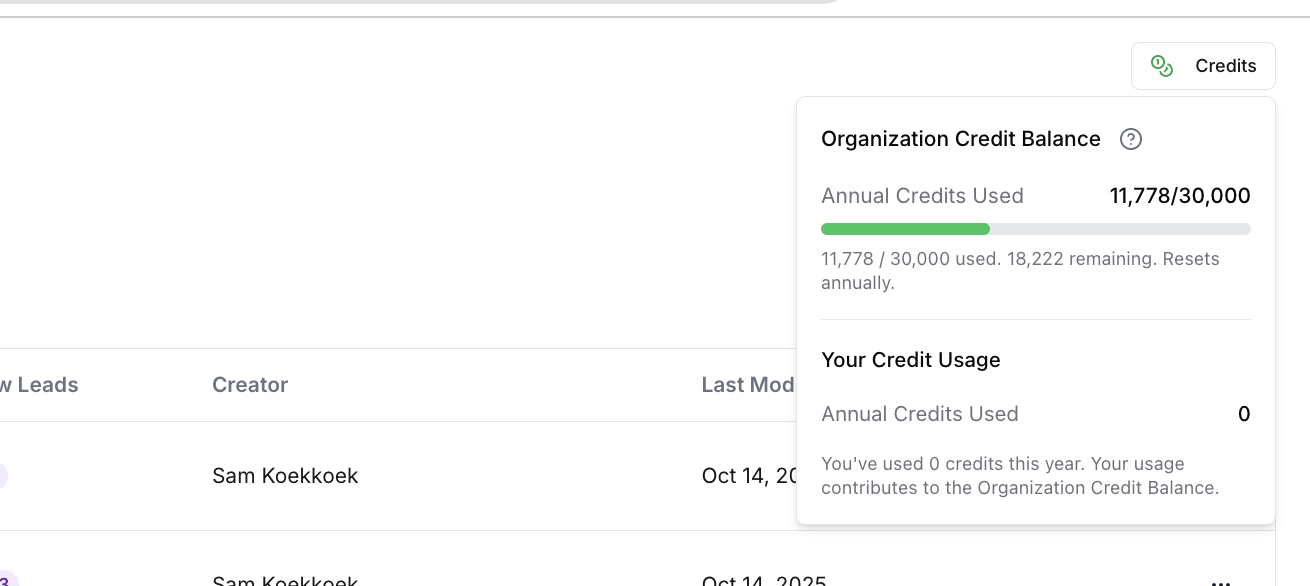
Your credit balance is visible in the upper right corner of the Bridge homepage and every bridge, as well as in organization settings (admins only).
What happens if I go over the credit limit?
What happens if I go over the credit limit?
You’ll receive notice via your preferred communication channel when you are close to exceeding your credit limit. You can upgrade the size of your credit plan at any time by connecting with your CSM. Any credits used above your purchase limit will be charged monthly at $0.13 per credit.
Do credits expire?
Do credits expire?
Credits are valid through the length of your annual agreement with Starbridge.
Can I control how credits are used by my team?
Can I control how credits are used by my team?
Yes. You can set limits for each team member on how many credits individual users may use during a given annual contract.
How much do more credits cost? What are my options?
How much do more credits cost? What are my options?
A number of annual credits is included in your Starbridge contract. Additional credit packages are available for purchase. Any overage credits are charged monthly at $0.13 per credit.
Who can I contact with questions?
Who can I contact with questions?
Reach out to your Starbridge account manager via Slack or email support@starbridge.ai.
Usage Details
Credits only apply to web based requests within Starbridge. Usage is dependent on the action being conducted:Building a Contacts Bridge
Building a Contacts Bridge
- Each Contacts Bridge consumes 2 credits for every contact it returns that your organization hasn’t unlocked in the last 365 days.
- Example use case: identifying key decision makers within a defined target market.
Building a Custom Web Signal Bridge
Building a Custom Web Signal Bridge
- Each Custom Web Signal Bridge consumes credits for every row within the bridge.
- Three models are available depending on request complexity:
- Core (1 credit per row)
- Pro (4 credits per row)
- Ultra (12 credits per row)
- Example use cases: recent leadership changes, legislative/regulatory changes.
Adding Web Agent or Contact columns to other bridges
Adding Web Agent or Contact columns to other bridges
- Each web agent column consumes credits for every row within the bridge (model-based pricing as above).
- Each contact column consumes 2 credits for every contact it returns that your organization hasn’t unlocked in the last 365 days.
- Meeting bridges can source contacts from meeting content (non-web based), which does not use credits.
Example Scenarios
K12 demand gen: enrich superintendent contacts
K12 demand gen: enrich superintendent contacts
I am a Director of Demand Generation at a K12 edtech targeting school districts in the Northeast.
Goal: get contact information for all superintendents across all school districts in NY, NJ, PA, MA, CT, RI, VT, ME, NH.
Total credit usage: 4,000 school districts × 1 contact × 2 credits/contact = 8,000 credits/year while those contacts stay in use
Goal: get contact information for all superintendents across all school districts in NY, NJ, PA, MA, CT, RI, VT, ME, NH.
Total credit usage: 4,000 school districts × 1 contact × 2 credits/contact = 8,000 credits/year while those contacts stay in use
Govtech BDR: use web agents for enrichment
Govtech BDR: use web agents for enrichment
I am a BDR Lead at a govtech targeting cities and counties across the US.
Goal: use the web agent to enrich information about existing system usage and recent leadership job changes across cities and counties with relevant meeting signals.
Total credit usage: 750 meetings × 2 web-agent columns × 1 credit/column = 1,500 credits (one-time)
Goal: use the web agent to enrich information about existing system usage and recent leadership job changes across cities and counties with relevant meeting signals.
Total credit usage: 750 meetings × 2 web-agent columns × 1 credit/column = 1,500 credits (one-time)
Higher Ed CFO: grant scan every 3 months
Higher Ed CFO: grant scan every 3 months
I am a CFO of a Higher Ed edtech targeting all colleges in the US.
Goal: scan for schools that have received grants for technology funding every 3 months.
Total credit usage: 2,500 colleges × 1 credit/college × 4 reruns/year = 10,000 credits/year
Goal: scan for schools that have received grants for technology funding every 3 months.
Total credit usage: 2,500 colleges × 1 credit/college × 4 reruns/year = 10,000 credits/year
EdTech marketing: enrich multiple titles per district
EdTech marketing: enrich multiple titles per district
I am a Marketing Manager at an EdTech targeting school districts above 2,500 in enrollment.
Goal: get contact information for up to 5 contacts per district across titles like “Assistant Superintendent of Instruction”, “Assistant Superintendent of Curriculum”, “Chief Academic Officer”, “HR Director”, “HR Manager”.
Total credit usage: 4,000 school districts × 3 contacts returned per district (avg) × 2 credits/contact = 24,000 credits/year
Goal: get contact information for up to 5 contacts per district across titles like “Assistant Superintendent of Instruction”, “Assistant Superintendent of Curriculum”, “Chief Academic Officer”, “HR Director”, “HR Manager”.
Total credit usage: 4,000 school districts × 3 contacts returned per district (avg) × 2 credits/contact = 24,000 credits/year