> ## Documentation Index
> Fetch the complete documentation index at: https://hc.starbridge.ai/llms.txt
> Use this file to discover all available pages before exploring further.
# MCP Sample Use Cases
> Ready-to-adapt prompts for putting the Starbridge MCP to work across Bridges, Feed, signals, contacts, and deep research.
Examples on this page are illustrative — built in Starbridge's real style (real Bridge types, real vendor names, real public-sector categories) to clearly demonstrate what each use case does, rather than pulled verbatim from one live account. Institution names, contacts, and figures are composites; nothing here should be read as an actual customer, buyer, or individual's record.
These are example prompts for putting the Starbridge MCP to work — bringing live Starbridge intelligence into Claude, ChatGPT, and any AI tool you already use. For what the MCP is and how to connect it, see [Overview and Installation](/research/starbridge-mcp).
Pick the tab that matches your role to see the use cases built for you. Several use cases show up under more than one tab — that's intentional, not a mistake
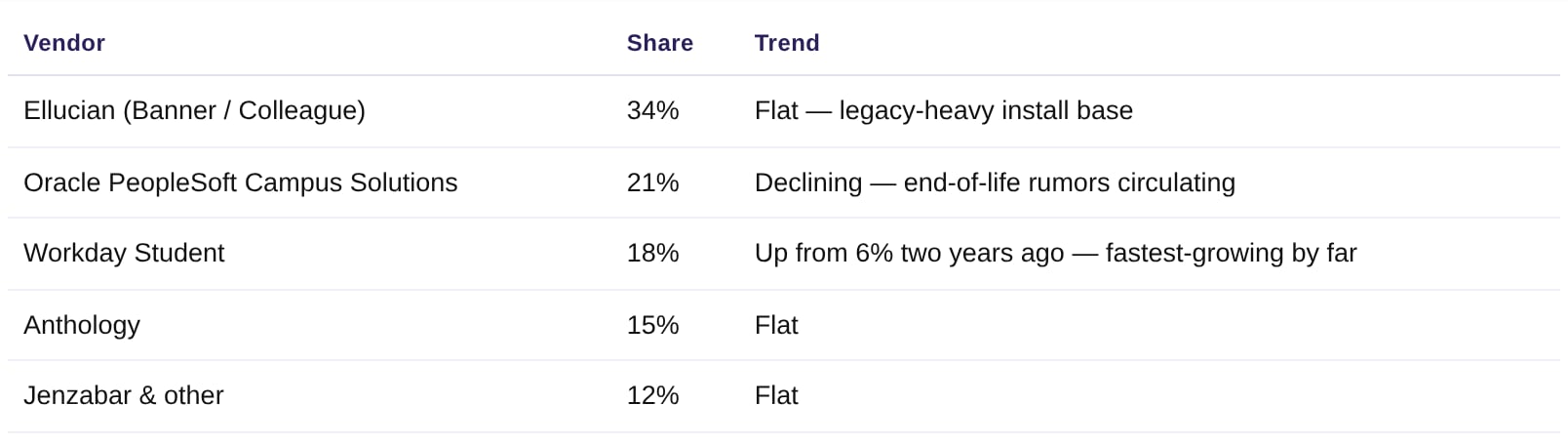
### Visualize a Bridge
*Who: Sales leaders, RevOps, Marketing.*
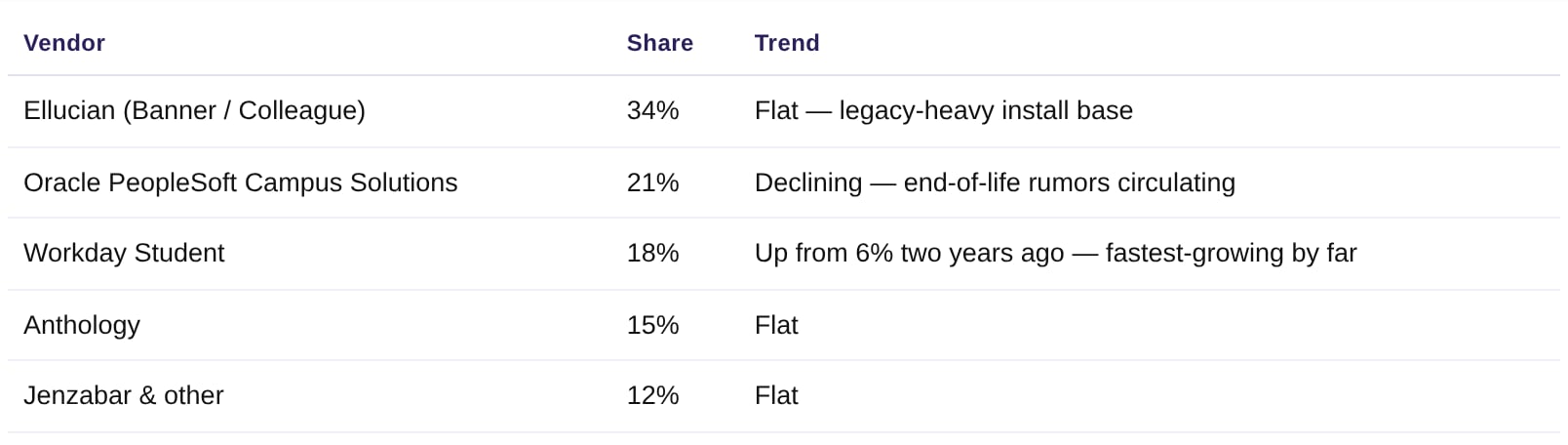
Pull Bridge data into a tool that can chart it — vendor-presence breakdowns, attribute distributions, or territory views — without an export or a BI tool in the loop.
> *"Pull the Higher-Ed ERP & SIS bridge and build a bar chart of vendor share across our tracked buyers — and flag whichever vendor is gaining share fastest."*
 ***
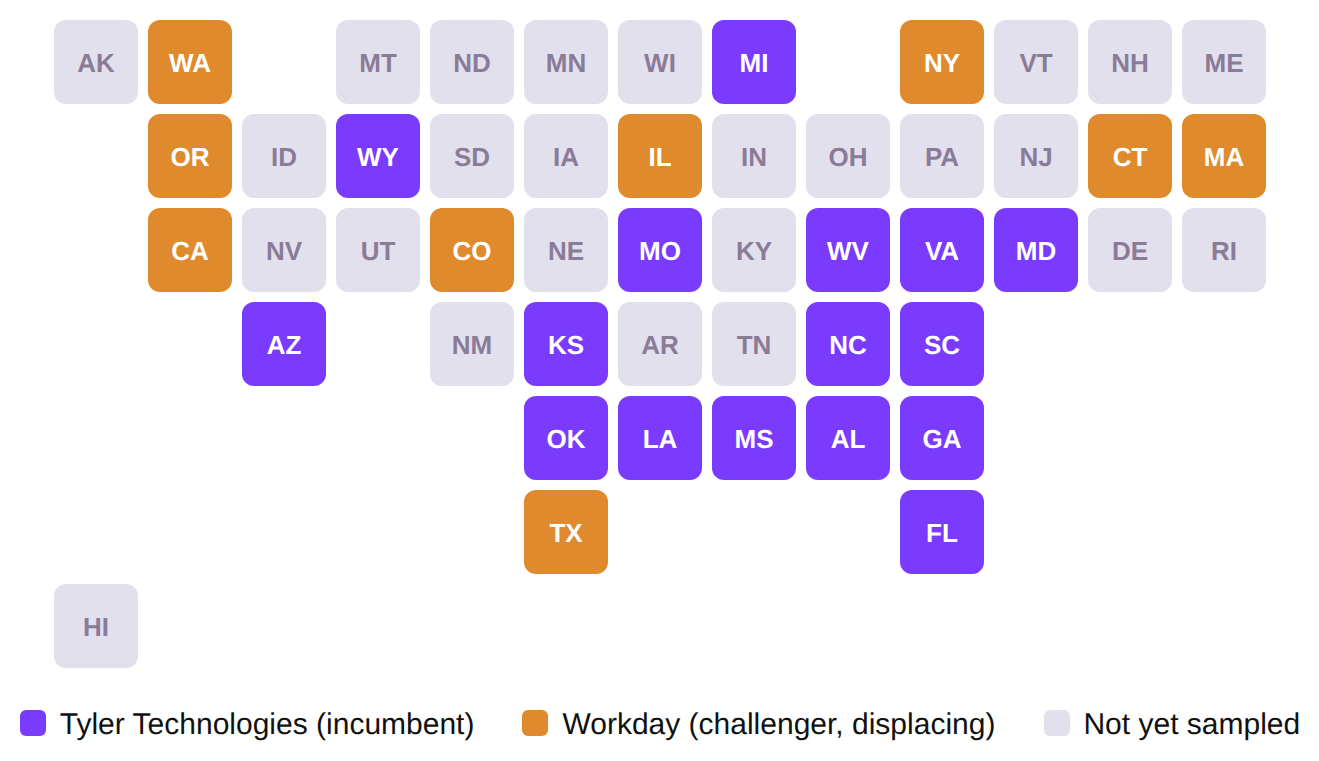
### Competitor-density map
*Who: Sales leaders, RevOps, Marketing.*
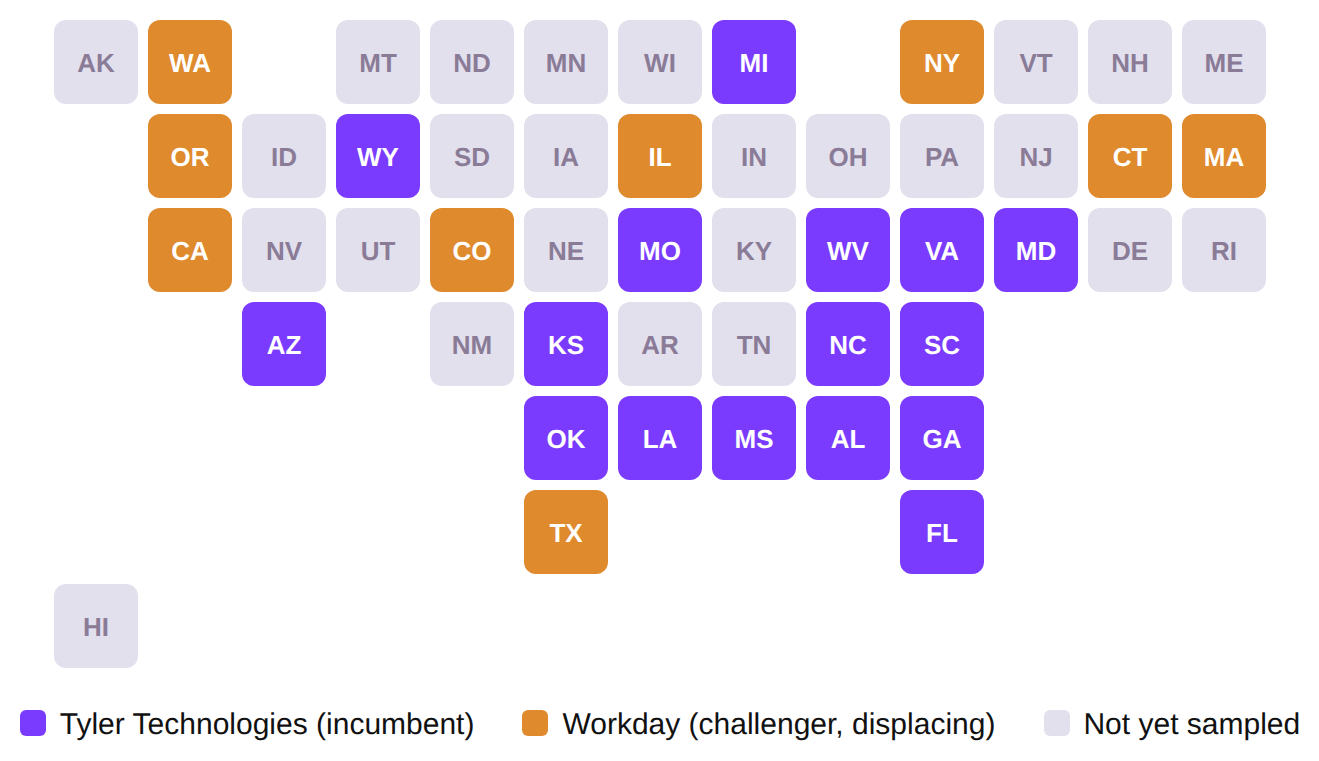
See who owns the local-government ERP market state by state — and exactly where the incumbent is already getting displaced — as a map, not a spreadsheet.
> *"Using the Local Government ERP bridge, tell me which states each vendor is active in, and show it to me as a map."*
**17** states where **Tyler Technologies** is the incumbent local-gov ERP · **8** states where **Workday** has already displaced them, concentrated on the coasts · **25** states with an active vendor signal in this sample
***
### Competitor-density map
*Who: Sales leaders, RevOps, Marketing.*
See who owns the local-government ERP market state by state — and exactly where the incumbent is already getting displaced — as a map, not a spreadsheet.
> *"Using the Local Government ERP bridge, tell me which states each vendor is active in, and show it to me as a map."*
**17** states where **Tyler Technologies** is the incumbent local-gov ERP · **8** states where **Workday** has already displaced them, concentrated on the coasts · **25** states with an active vendor signal in this sample
 ***
### RFP qualification
*Who: Sales leaders, AE, RevOps.*
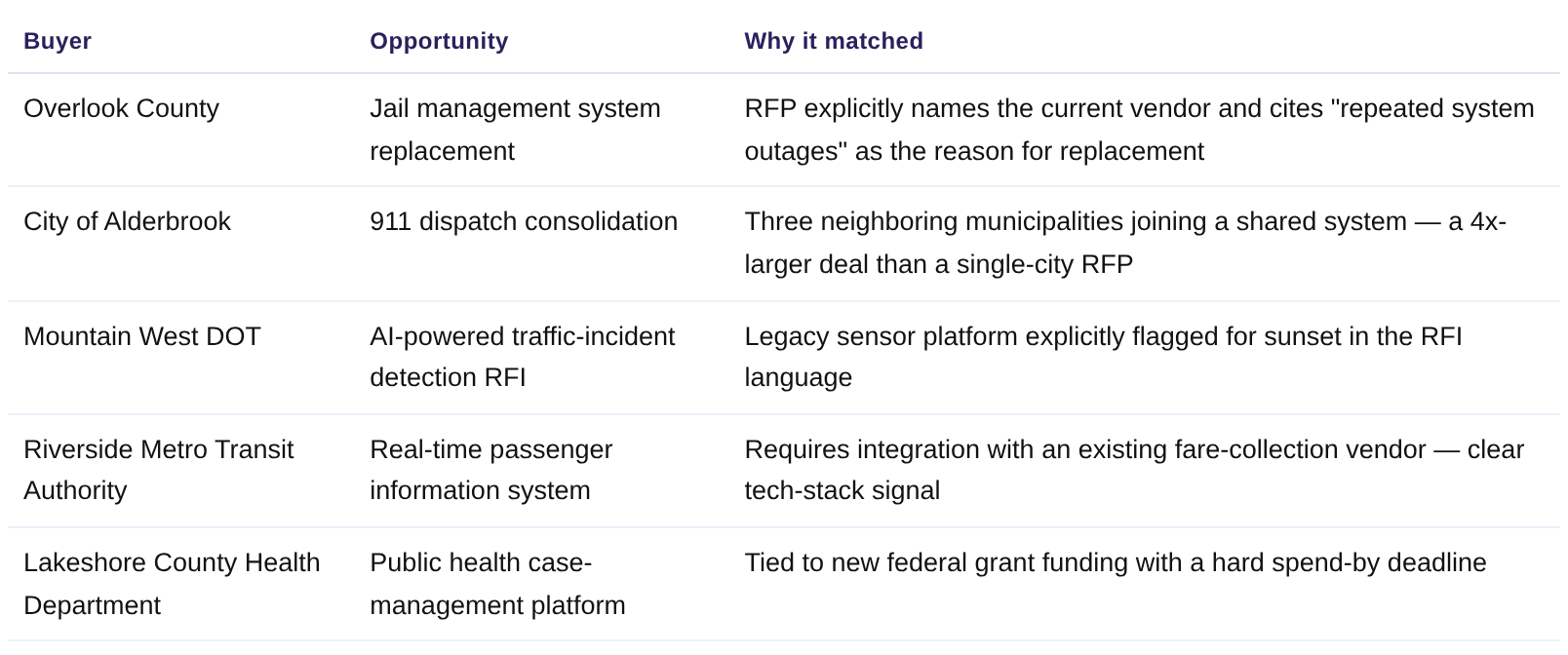
Skip the RFP graveyard — get matched, scored opportunities instead of a raw procurement-portal feed.
> *"Show me our highest-scoring active RFPs, with a one-line reason each one matched."*
***
### RFP qualification
*Who: Sales leaders, AE, RevOps.*
Skip the RFP graveyard — get matched, scored opportunities instead of a raw procurement-portal feed.
> *"Show me our highest-scoring active RFPs, with a one-line reason each one matched."*
 ***
### Scheduled Slack digest
*Who: Sales leaders, RevOps.*
The same triage as "morning triage" — except nobody has to remember to ask for it.
> *"Every weekday at 7am, post a Starbridge Feed digest to #sales-signals: top 3 signals grouped by urgency."*
***
### Scheduled Slack digest
*Who: Sales leaders, RevOps.*
The same triage as "morning triage" — except nobody has to remember to ask for it.
> *"Every weekday at 7am, post a Starbridge Feed digest to #sales-signals: top 3 signals grouped by urgency."*
 Pair this prompt with a scheduled task so the digest posts automatically — the value here is that Starbridge comes to the channel, instead of someone remembering to open it.
***
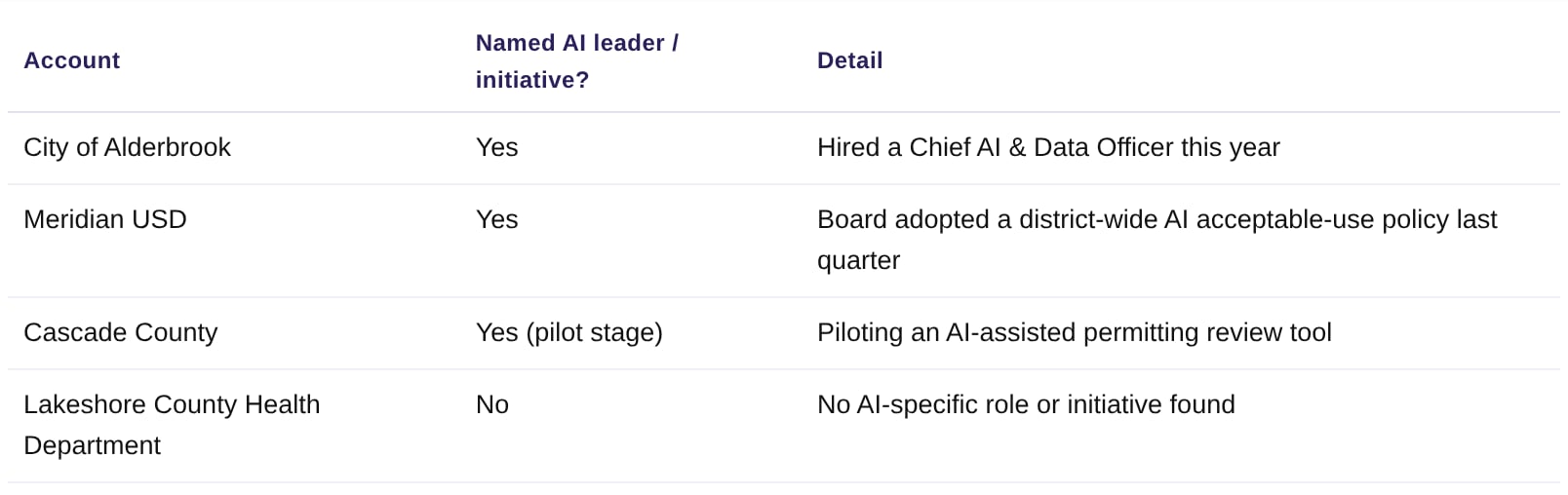
### AI adoption & propensity scoring
*Who: Sales leaders, RevOps.*
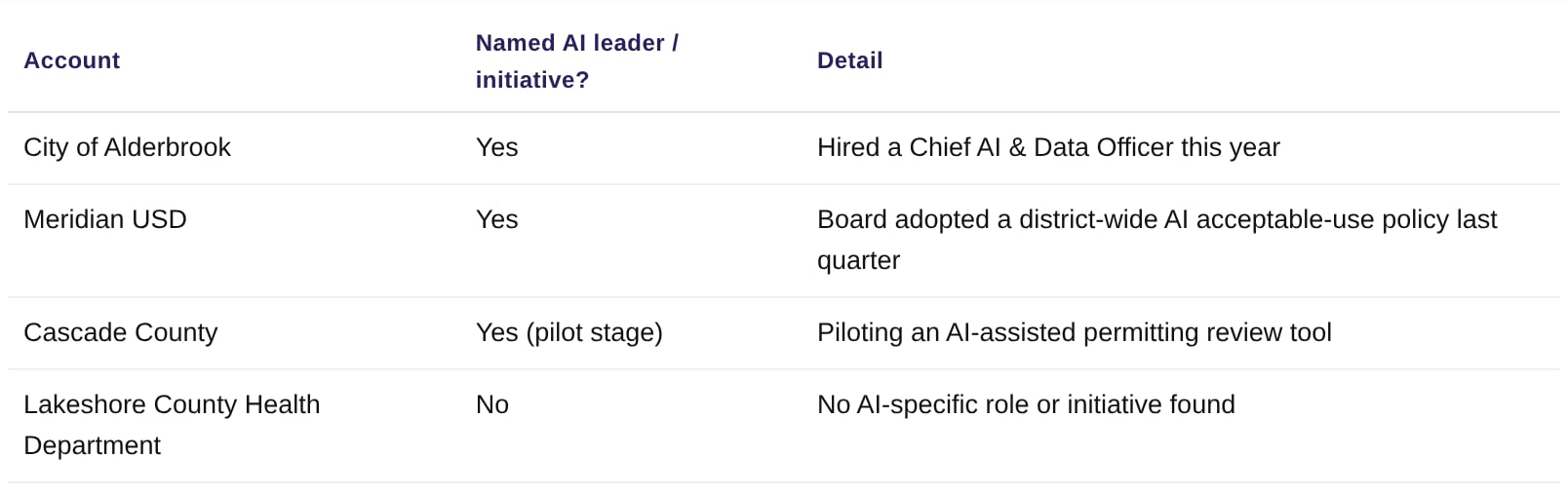
Use Starbridge's pre-computed scores to prioritize a list, instead of scoring accounts by hand from news and meeting minutes.
> *"Which of my accounts already have a named AI leader or a documented AI initiative?"*
Pair this prompt with a scheduled task so the digest posts automatically — the value here is that Starbridge comes to the channel, instead of someone remembering to open it.
***
### AI adoption & propensity scoring
*Who: Sales leaders, RevOps.*
Use Starbridge's pre-computed scores to prioritize a list, instead of scoring accounts by hand from news and meeting minutes.
> *"Which of my accounts already have a named AI leader or a documented AI initiative?"*
 ### Morning triage
*Who: AE, BDR.*
Convert the raw Feed into an action list — grouped by urgency, not just a flat chronological dump.
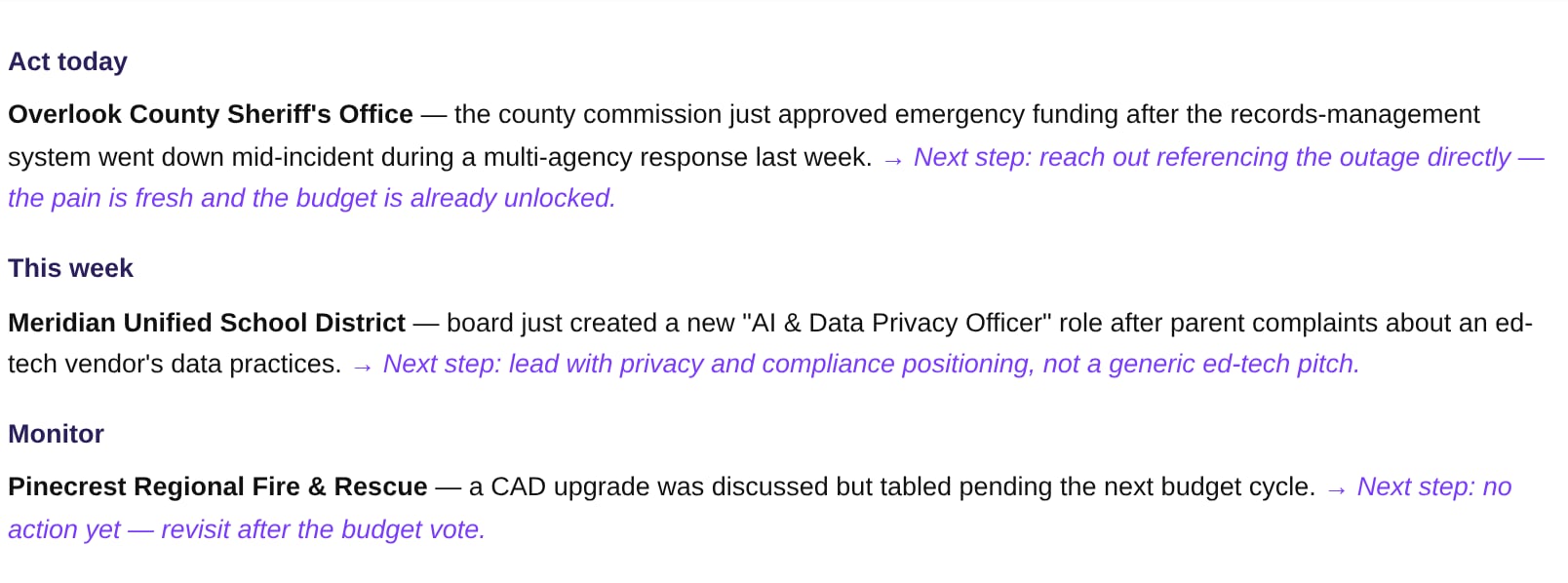
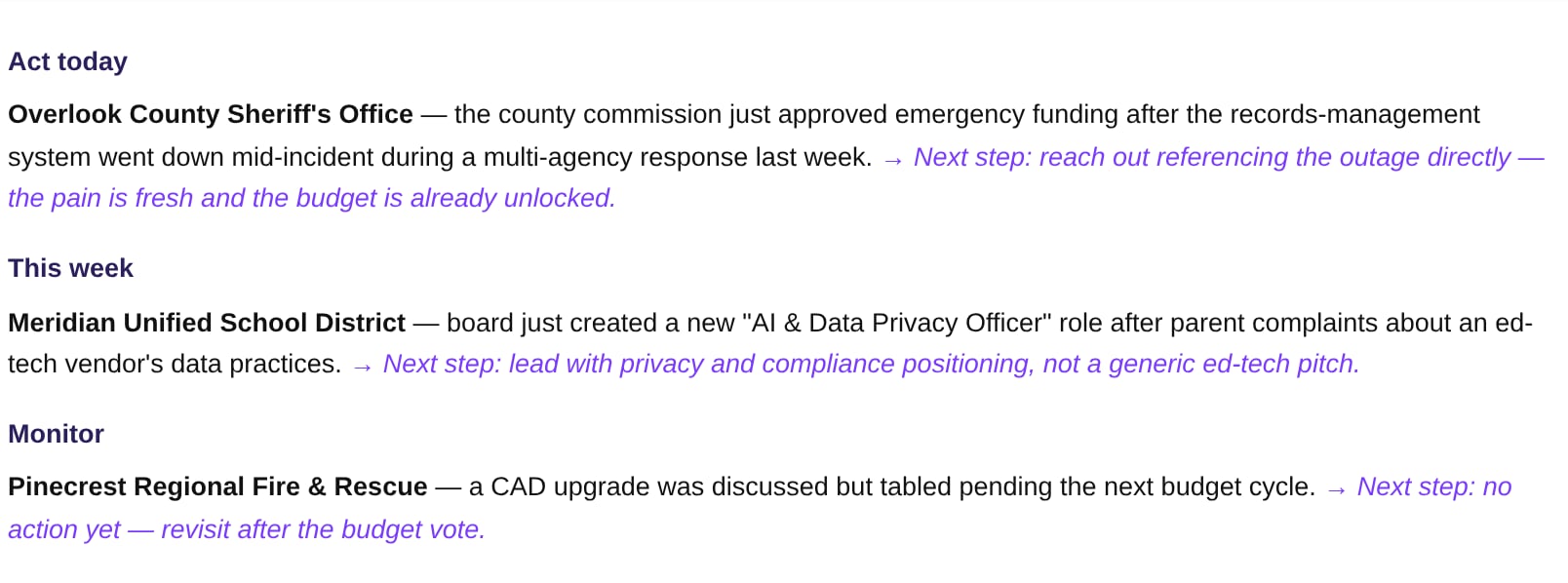
> *"Read my Starbridge feed from the past week and group the signals into 'act today,' 'this week,' and 'monitor.' For anything in 'act today,' suggest the single best next step."*
### Morning triage
*Who: AE, BDR.*
Convert the raw Feed into an action list — grouped by urgency, not just a flat chronological dump.
> *"Read my Starbridge feed from the past week and group the signals into 'act today,' 'this week,' and 'monitor.' For anything in 'act today,' suggest the single best next step."*
 ***
### Build the buying committee
*Who: AE, BDR.*
Get the right roles, not just any names.
> *"Pull verified Starbridge contacts at Bright Horizon Community College District for these personas: VP of IT, Dean of Enrollment Management, and CFO. Give me name, title, and email in a table."*
***
### Build the buying committee
*Who: AE, BDR.*
Get the right roles, not just any names.
> *"Pull verified Starbridge contacts at Bright Horizon Community College District for these personas: VP of IT, Dean of Enrollment Management, and CFO. Give me name, title, and email in a table."*
 ***
### The "why now" outreach angle
*Who: BDR, AE.*
Turn a signal into the first line of an email, not just a data point sitting in a feed.
> *"Using the Overlook County outage signal, write a 2-sentence cold email opener that references the specific pain point."*
***
### The "why now" outreach angle
*Who: BDR, AE.*
Turn a signal into the first line of an email, not just a data point sitting in a feed.
> *"Using the Overlook County outage signal, write a 2-sentence cold email opener that references the specific pain point."*
 ***
### Automated outreach drafting
*Who: BDR, SDR.*
Draft the first outreach touch grounded in a real signal, ready for a human to review before anything sends.
> *"Draft a 3-line outbound email to Overlook County Sheriff's Office referencing the recent outage, ready for me to review before sending."*
***
### Automated outreach drafting
*Who: BDR, SDR.*
Draft the first outreach touch grounded in a real signal, ready for a human to review before anything sends.
> *"Draft a 3-line outbound email to Overlook County Sheriff's Office referencing the recent outage, ready for me to review before sending."*
 This mirrors how the underlying MCP tools actually work: they create a draft (sequence step, email draft), they don't dispatch it. A human stays in the loop before anything reaches a real inbox.
### Visualize a Bridge
*Who: Sales leaders, RevOps, Marketing.*
Pull Bridge data into a tool that can chart it — vendor-presence breakdowns, attribute distributions, or territory views — without an export or a BI tool in the loop.
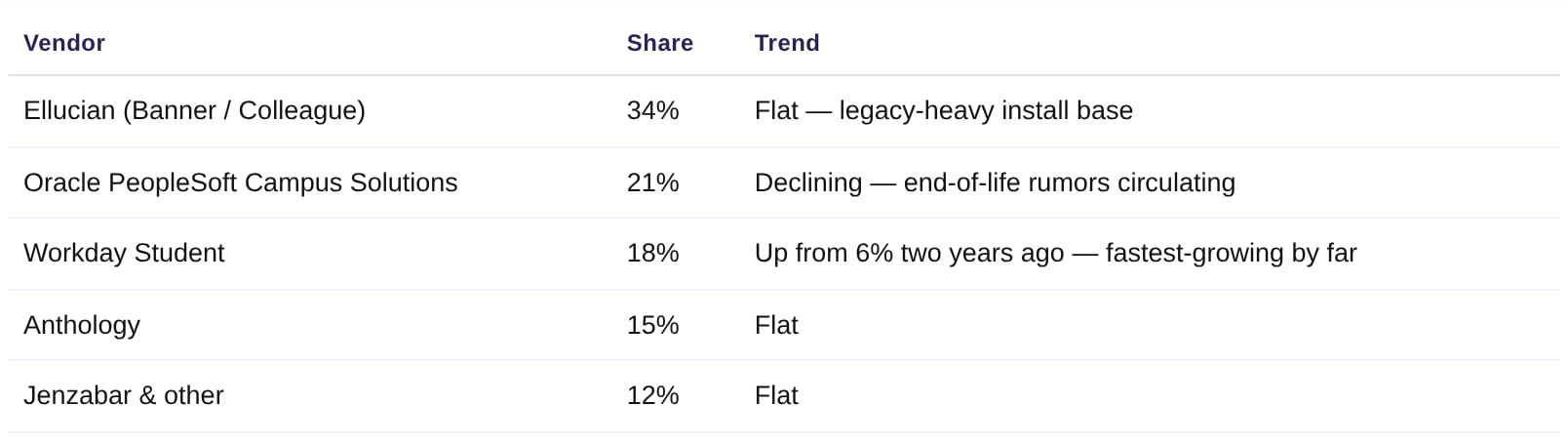
> *"Pull the Higher-Ed ERP & SIS bridge and build a bar chart of vendor share across our tracked buyers — and flag whichever vendor is gaining share fastest."*
This mirrors how the underlying MCP tools actually work: they create a draft (sequence step, email draft), they don't dispatch it. A human stays in the loop before anything reaches a real inbox.
### Visualize a Bridge
*Who: Sales leaders, RevOps, Marketing.*
Pull Bridge data into a tool that can chart it — vendor-presence breakdowns, attribute distributions, or territory views — without an export or a BI tool in the loop.
> *"Pull the Higher-Ed ERP & SIS bridge and build a bar chart of vendor share across our tracked buyers — and flag whichever vendor is gaining share fastest."*
 ***
### Competitor-density map
*Who: Sales leaders, RevOps, Marketing.*
See who owns the local-government ERP market state by state — and exactly where the incumbent is already getting displaced — as a map, not a spreadsheet.
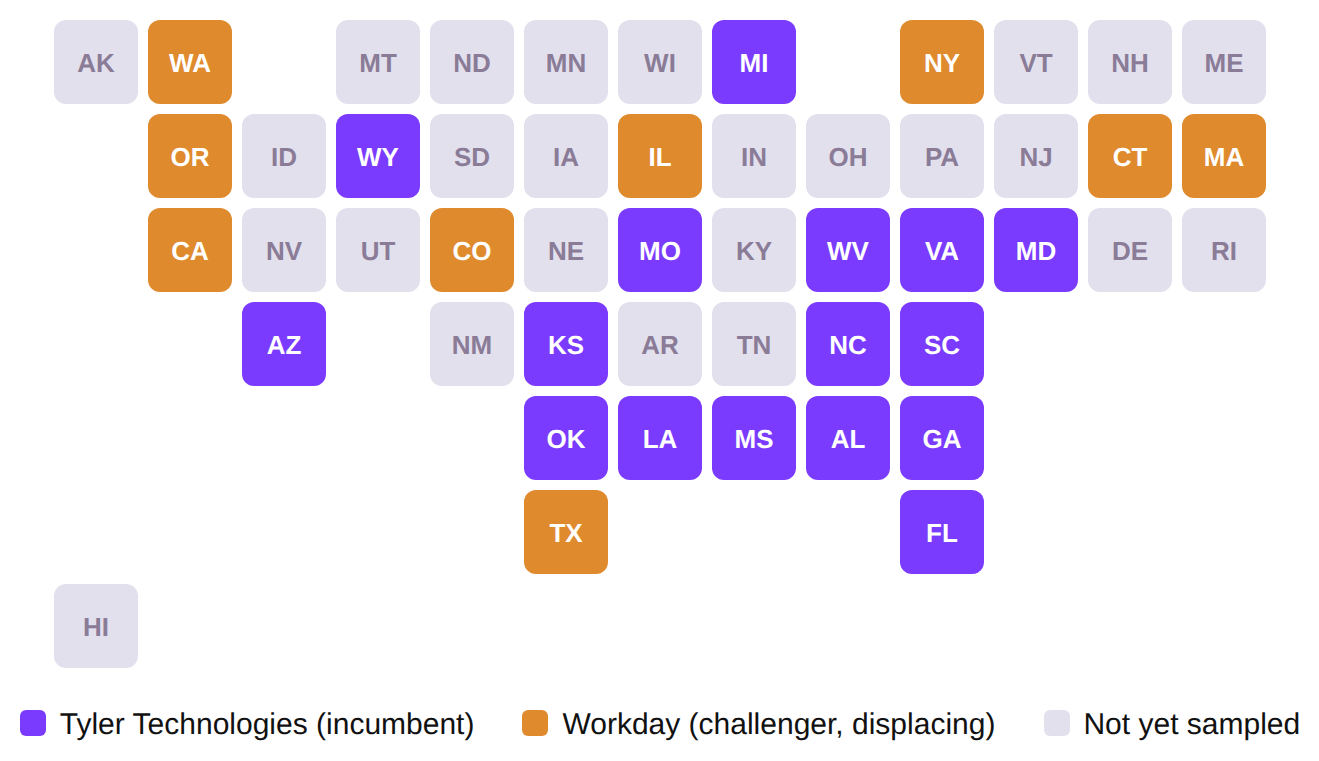
> *"Using the Local Government ERP bridge, tell me which states each vendor is active in, and show it to me as a map."*
**17** states where **Tyler Technologies** is the incumbent local-gov ERP · **8** states where **Workday** has already displaced them, concentrated on the coasts · **25** states with an active vendor signal in this sample
***
### Competitor-density map
*Who: Sales leaders, RevOps, Marketing.*
See who owns the local-government ERP market state by state — and exactly where the incumbent is already getting displaced — as a map, not a spreadsheet.
> *"Using the Local Government ERP bridge, tell me which states each vendor is active in, and show it to me as a map."*
**17** states where **Tyler Technologies** is the incumbent local-gov ERP · **8** states where **Workday** has already displaced them, concentrated on the coasts · **25** states with an active vendor signal in this sample
 ***
### Find themes and trends
*Who: Marketing, RevOps.*
Spot the pattern across many accounts at once, instead of noticing it only after the third individual signal.
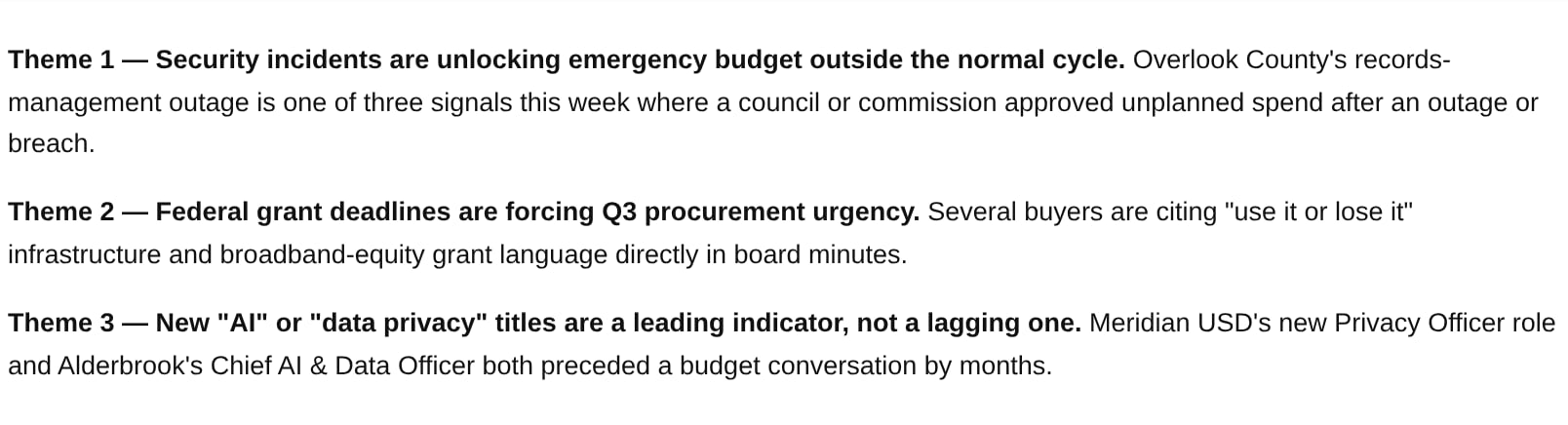
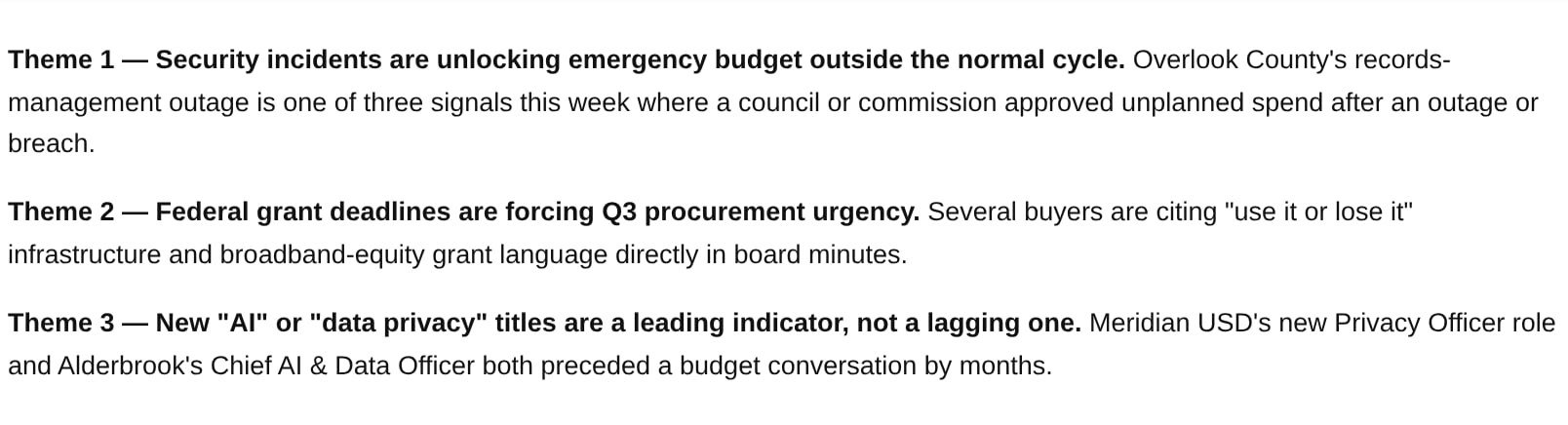
> *"Look across this week's top Feed signals and tell me the recurring themes, with one supporting example each."*
***
### Find themes and trends
*Who: Marketing, RevOps.*
Spot the pattern across many accounts at once, instead of noticing it only after the third individual signal.
> *"Look across this week's top Feed signals and tell me the recurring themes, with one supporting example each."*
 ***
### CRM-grounded meeting prep
*Who: RevOps, AE.*
Add the one fact the CRM doesn't have to every pipeline review, instead of running a separate research pass per account.
> *"For every account in my pipeline review today, give me one Starbridge fact I don't already have in the CRM."*
***
### CRM-grounded meeting prep
*Who: RevOps, AE.*
Add the one fact the CRM doesn't have to every pipeline review, instead of running a separate research pass per account.
> *"For every account in my pipeline review today, give me one Starbridge fact I don't already have in the CRM."*
 ***
### CRM data hygiene
*Who: RevOps.*
Spot where the CRM and reality have drifted apart, and queue the correction — Starbridge surfaces the mismatch; a human (or the CRM sync) still makes the write.
> *"Compare our CRM's primary contact and budget fields against Starbridge's latest confirmed data for these accounts and flag any mismatches."*
***
### CRM data hygiene
*Who: RevOps.*
Spot where the CRM and reality have drifted apart, and queue the correction — Starbridge surfaces the mismatch; a human (or the CRM sync) still makes the write.
> *"Compare our CRM's primary contact and budget fields against Starbridge's latest confirmed data for these accounts and flag any mismatches."*
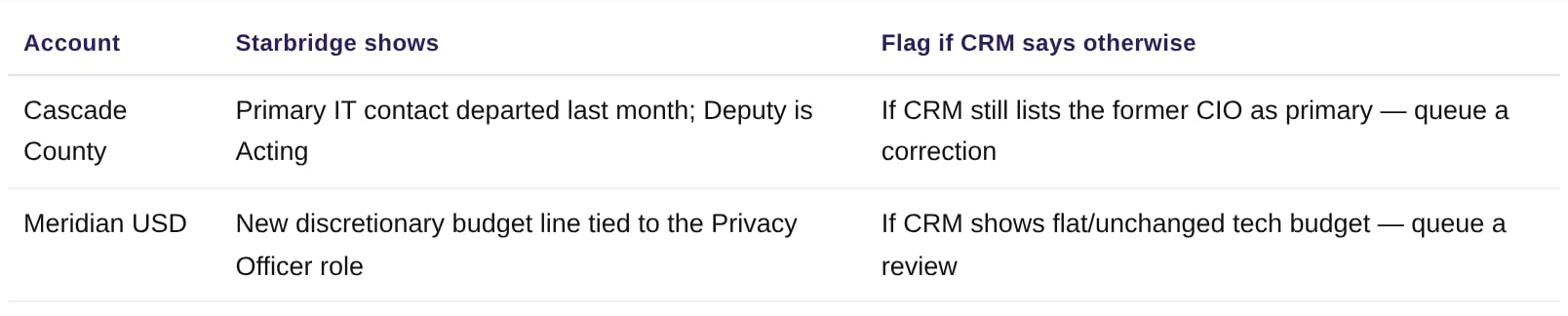 This intentionally stops at "flag a mismatch." Starbridge doesn't write back to the CRM on its own here — a person (or an approved sync job) still confirms and applies the correction.
***
### AI adoption & propensity scoring
*Who: Sales leaders, RevOps.*
Use Starbridge's pre-computed scores to prioritize a list, instead of scoring accounts by hand from news and meeting minutes.
> *"Which of my accounts already have a named AI leader or a documented AI initiative?"*
This intentionally stops at "flag a mismatch." Starbridge doesn't write back to the CRM on its own here — a person (or an approved sync job) still confirms and applies the correction.
***
### AI adoption & propensity scoring
*Who: Sales leaders, RevOps.*
Use Starbridge's pre-computed scores to prioritize a list, instead of scoring accounts by hand from news and meeting minutes.
> *"Which of my accounts already have a named AI leader or a documented AI initiative?"*
 ### Visualize a Bridge
*Who: Sales leaders, RevOps, Marketing.*
Pull Bridge data into a tool that can chart it — vendor-presence breakdowns, attribute distributions, or territory views — without an export or a BI tool in the loop.
> *"Pull the Higher-Ed ERP & SIS bridge and build a bar chart of vendor share across our tracked buyers — and flag whichever vendor is gaining share fastest."*
### Visualize a Bridge
*Who: Sales leaders, RevOps, Marketing.*
Pull Bridge data into a tool that can chart it — vendor-presence breakdowns, attribute distributions, or territory views — without an export or a BI tool in the loop.
> *"Pull the Higher-Ed ERP & SIS bridge and build a bar chart of vendor share across our tracked buyers — and flag whichever vendor is gaining share fastest."*
 ***
### Competitor-density map
*Who: Sales leaders, RevOps, Marketing.*
See who owns the local-government ERP market state by state — and exactly where the incumbent is already getting displaced — as a map, not a spreadsheet.
> *"Using the Local Government ERP bridge, tell me which states each vendor is active in, and show it to me as a map."*
**17** states where **Tyler Technologies** is the incumbent local-gov ERP · **8** states where **Workday** has already displaced them, concentrated on the coasts · **25** states with an active vendor signal in this sample
***
### Competitor-density map
*Who: Sales leaders, RevOps, Marketing.*
See who owns the local-government ERP market state by state — and exactly where the incumbent is already getting displaced — as a map, not a spreadsheet.
> *"Using the Local Government ERP bridge, tell me which states each vendor is active in, and show it to me as a map."*
**17** states where **Tyler Technologies** is the incumbent local-gov ERP · **8** states where **Workday** has already displaced them, concentrated on the coasts · **25** states with an active vendor signal in this sample
 ***
### ABM list-building
*Who: Marketing.*
Build a target list that's scored and reasoned, not just a spreadsheet of institution names pulled from a directory.
> *"Give me our top-scored ABM accounts with the signal driving each score."*
***
### ABM list-building
*Who: Marketing.*
Build a target list that's scored and reasoned, not just a spreadsheet of institution names pulled from a directory.
> *"Give me our top-scored ABM accounts with the signal driving each score."*
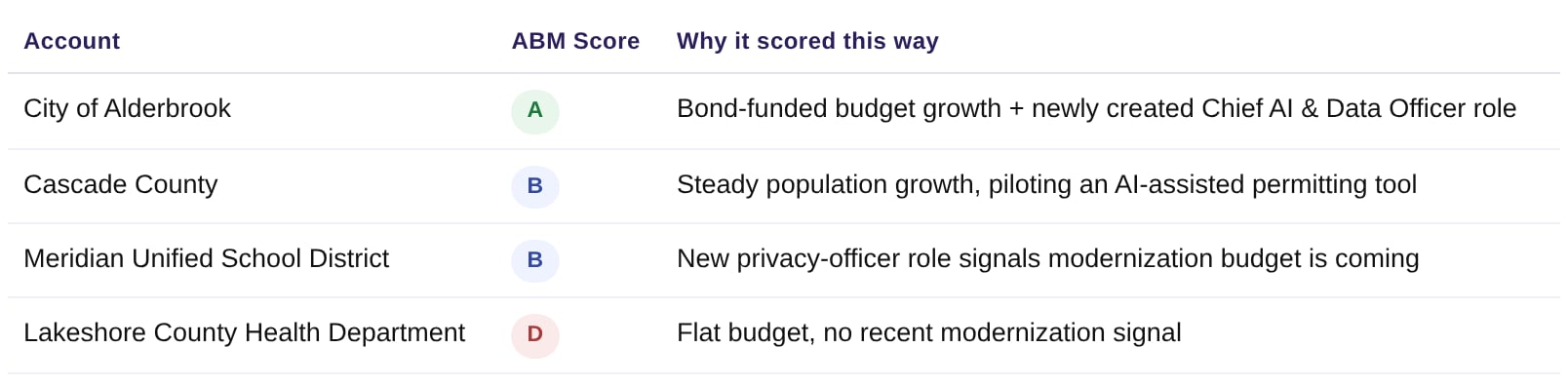 The score itself is something Starbridge computes on the bridge — Marketing filters straight to A/B accounts instead of re-deriving a score by hand from news and budget documents.
***
### Find themes and trends
*Who: Marketing, RevOps.*
Spot the pattern across many accounts at once, instead of noticing it only after the third individual signal.
> *"Look across this week's top Feed signals and tell me the recurring themes, with one supporting example each."*
The score itself is something Starbridge computes on the bridge — Marketing filters straight to A/B accounts instead of re-deriving a score by hand from news and budget documents.
***
### Find themes and trends
*Who: Marketing, RevOps.*
Spot the pattern across many accounts at once, instead of noticing it only after the third individual signal.
> *"Look across this week's top Feed signals and tell me the recurring themes, with one supporting example each."*
 ### Morning triage
*Who: AE, BDR.*
Convert the raw Feed into an action list — grouped by urgency, not just a flat chronological dump.
> *"Read my Starbridge feed from the past week and group the signals into 'act today,' 'this week,' and 'monitor.' For anything in 'act today,' suggest the single best next step."*
### Morning triage
*Who: AE, BDR.*
Convert the raw Feed into an action list — grouped by urgency, not just a flat chronological dump.
> *"Read my Starbridge feed from the past week and group the signals into 'act today,' 'this week,' and 'monitor.' For anything in 'act today,' suggest the single best next step."*
 ***
### Pre-meeting brief
*Who: AE, CS.*
Walk into every call knowing the account.
> *"I have a call with the City of Alderbrook tomorrow. Pull their Starbridge summary and recent signals and give me a one-page brief: top priorities, recent budget or board activity, any contracts expiring, and three smart questions to ask."*
***
### Pre-meeting brief
*Who: AE, CS.*
Walk into every call knowing the account.
> *"I have a call with the City of Alderbrook tomorrow. Pull their Starbridge summary and recent signals and give me a one-page brief: top priorities, recent budget or board activity, any contracts expiring, and three smart questions to ask."*
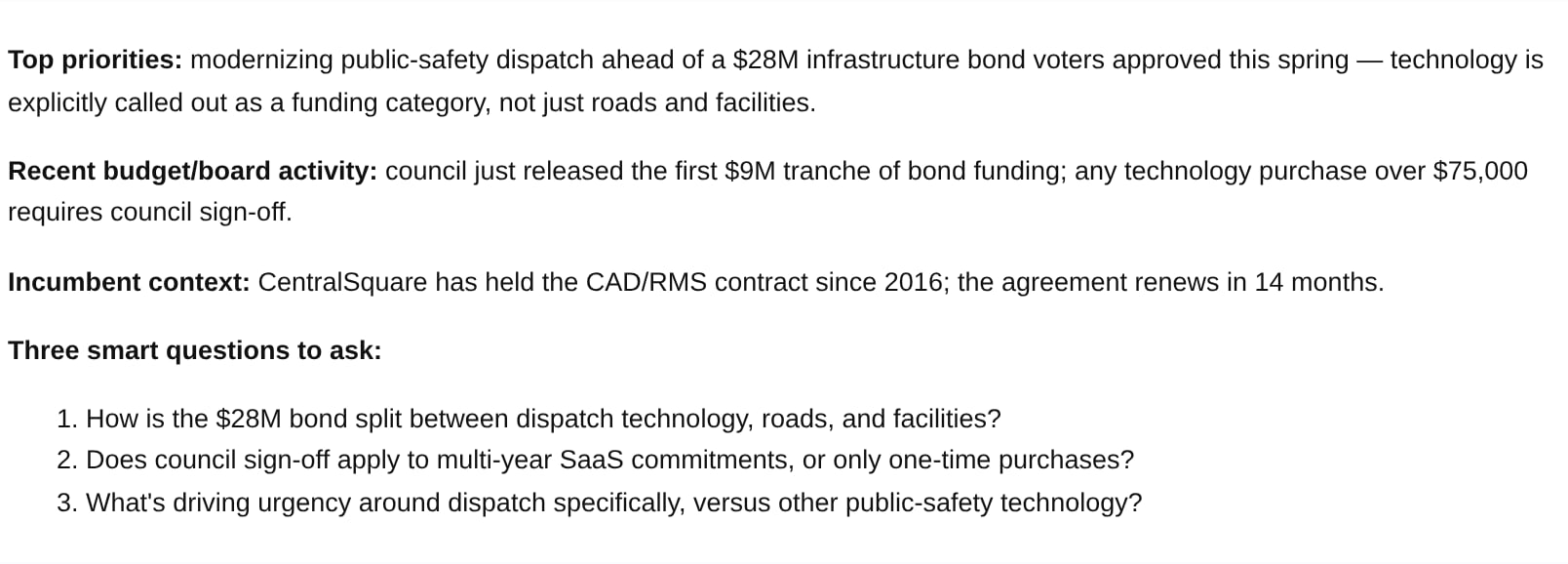 You can turn this into a Skill, combining it with other data sources (CRM, Gong, etc.) to create a complete meeting-prep tool.
***
### Build the buying committee
*Who: AE, BDR.*
Get the right roles, not just any names.
> *"Pull verified Starbridge contacts at Bright Horizon Community College District for these personas: VP of IT, Dean of Enrollment Management, and CFO. Give me name, title, and email in a table."*
You can turn this into a Skill, combining it with other data sources (CRM, Gong, etc.) to create a complete meeting-prep tool.
***
### Build the buying committee
*Who: AE, BDR.*
Get the right roles, not just any names.
> *"Pull verified Starbridge contacts at Bright Horizon Community College District for these personas: VP of IT, Dean of Enrollment Management, and CFO. Give me name, title, and email in a table."*
 ***
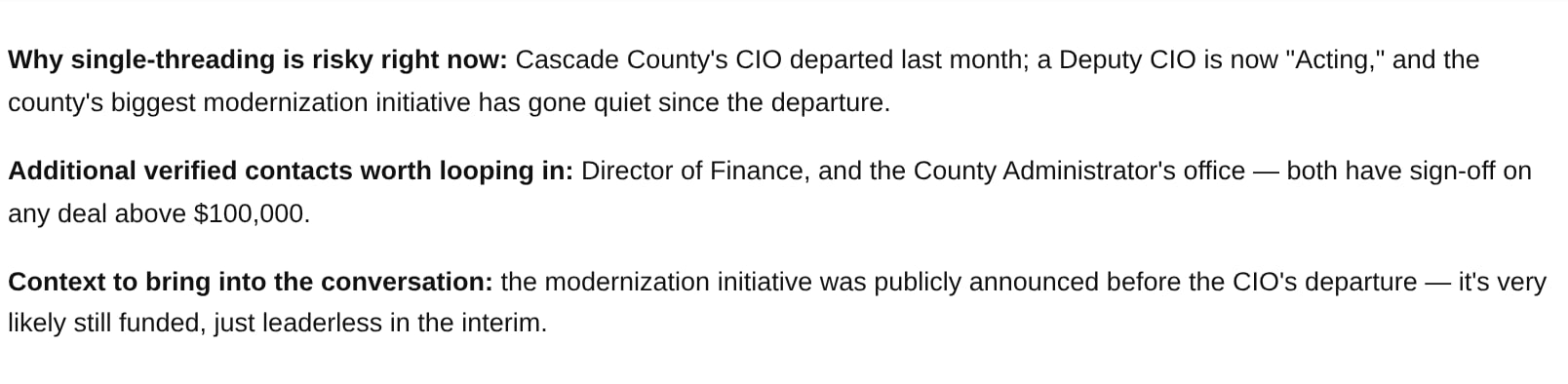
### Multi-thread a stalled deal
*Who: AE.*
When a deal goes quiet, get every verified contact and the reason single-threading is risky here — not just a reminder to "follow up."
> *"This deal at Cascade County has gone quiet. Pull every verified contact and recent signal so I can multi-thread instead of waiting on one person."*
***
### Multi-thread a stalled deal
*Who: AE.*
When a deal goes quiet, get every verified contact and the reason single-threading is risky here — not just a reminder to "follow up."
> *"This deal at Cascade County has gone quiet. Pull every verified contact and recent signal so I can multi-thread instead of waiting on one person."*
 ***
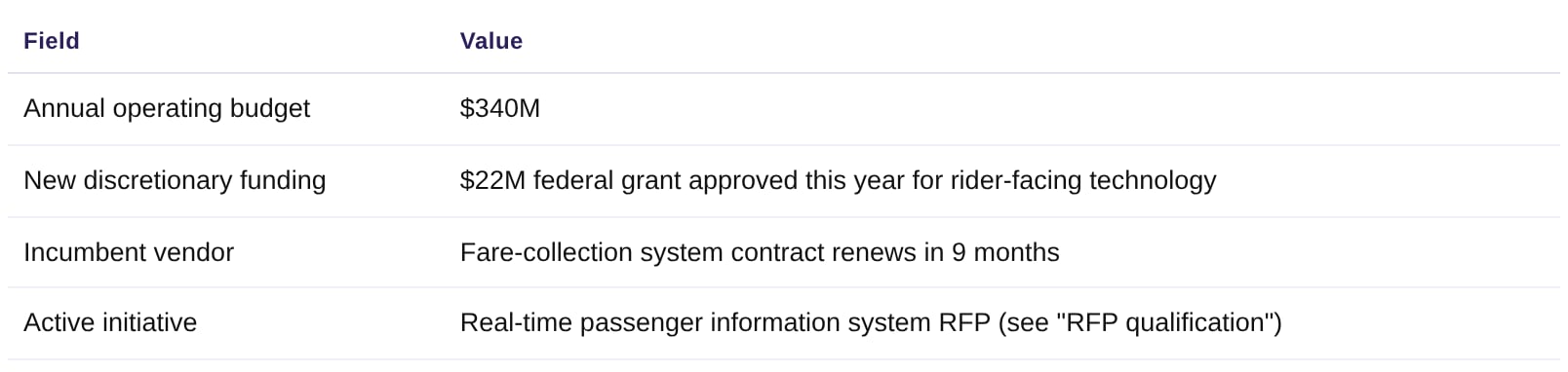
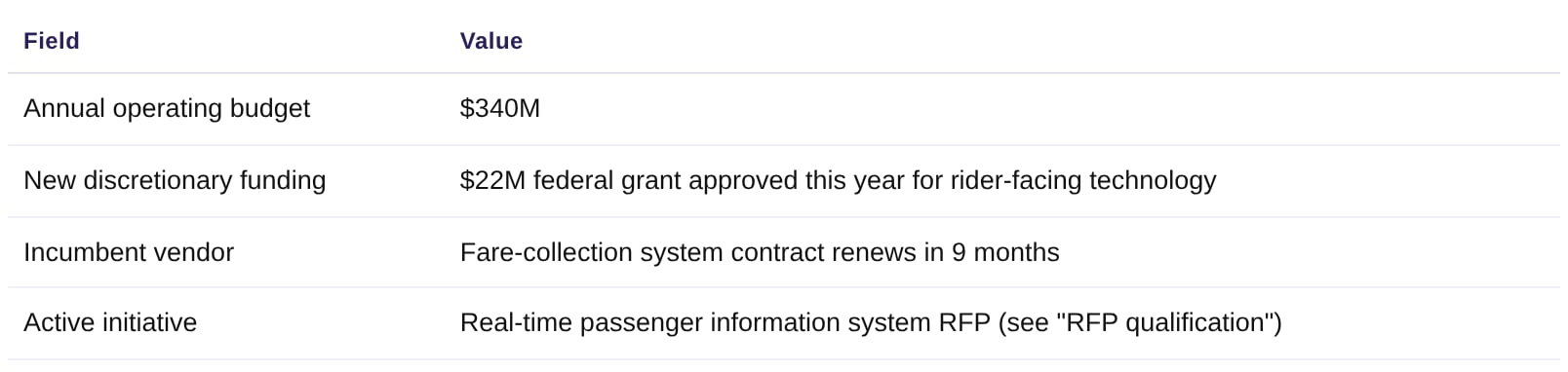
### Account plan grounding
*Who: AE, CS.*
Start account planning from real facts pulled live, instead of a blank template and a guess.
> *"Build me an account plan skeleton for Riverside Metro Transit Authority: budget, recent funding, incumbent vendor, and current initiatives."*
***
### Account plan grounding
*Who: AE, CS.*
Start account planning from real facts pulled live, instead of a blank template and a guess.
> *"Build me an account plan skeleton for Riverside Metro Transit Authority: budget, recent funding, incumbent vendor, and current initiatives."*
 ***
### Targeted document hunt
*Who: AE, RevOps.*
Find the exact contract or board quote in seconds, instead of skimming years of board-meeting minutes.
> *"Search Cascade County's files for anything about technology modernization spending."*
***
### Targeted document hunt
*Who: AE, RevOps.*
Find the exact contract or board quote in seconds, instead of skimming years of board-meeting minutes.
> *"Search Cascade County's files for anything about technology modernization spending."*
 ***
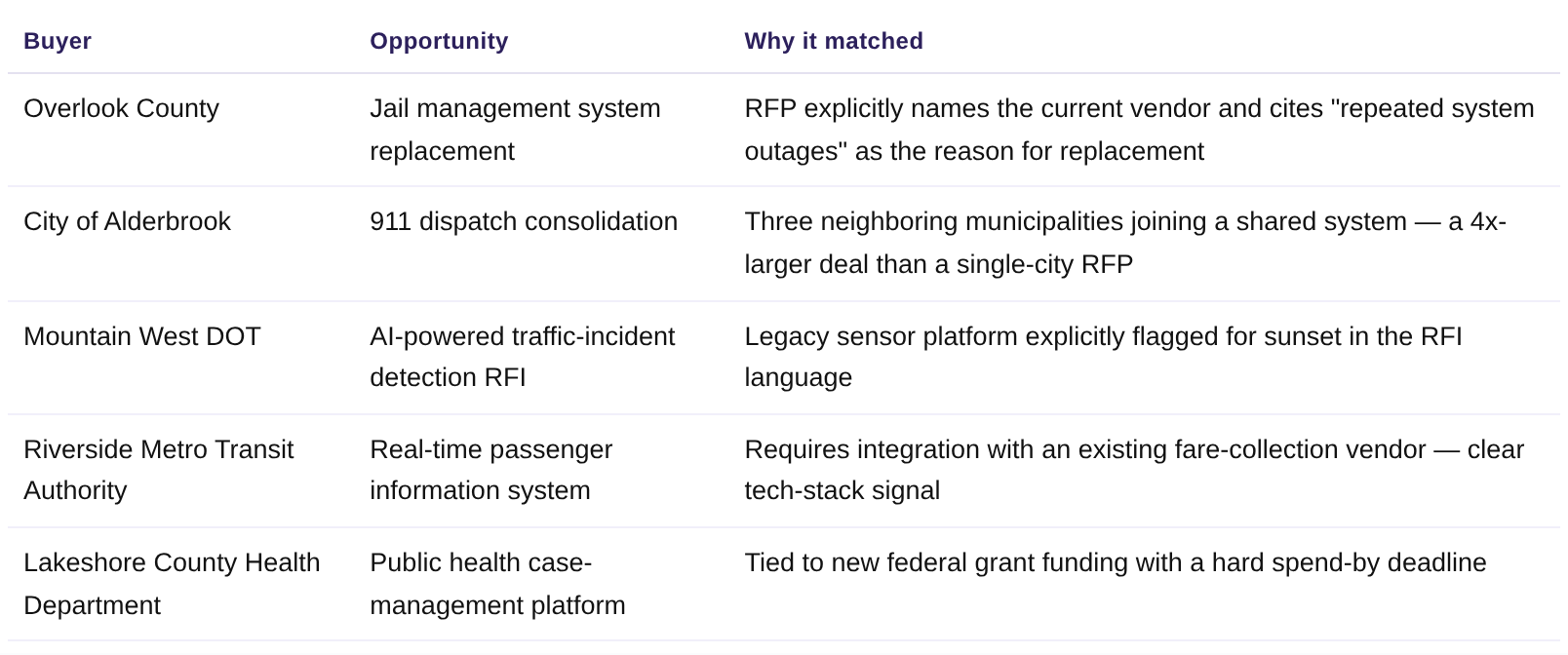
### RFP qualification
*Who: Sales leaders, AE, RevOps.*
Skip the RFP graveyard — get matched, scored opportunities instead of a raw procurement-portal feed.
> *"Show me our highest-scoring active RFPs, with a one-line reason each one matched."*
***
### RFP qualification
*Who: Sales leaders, AE, RevOps.*
Skip the RFP graveyard — get matched, scored opportunities instead of a raw procurement-portal feed.
> *"Show me our highest-scoring active RFPs, with a one-line reason each one matched."*
 ***
### Competitor contract renewal windows
*Who: AE, CS.*
Know exactly when a rival's contract ends so outreach lands before the buyer re-ups on autopilot.
> *"Show me tracked competitor contracts expiring in the next 12 months, with the vendor, product, and value."*
***
### Competitor contract renewal windows
*Who: AE, CS.*
Know exactly when a rival's contract ends so outreach lands before the buyer re-ups on autopilot.
> *"Show me tracked competitor contracts expiring in the next 12 months, with the vendor, product, and value."*
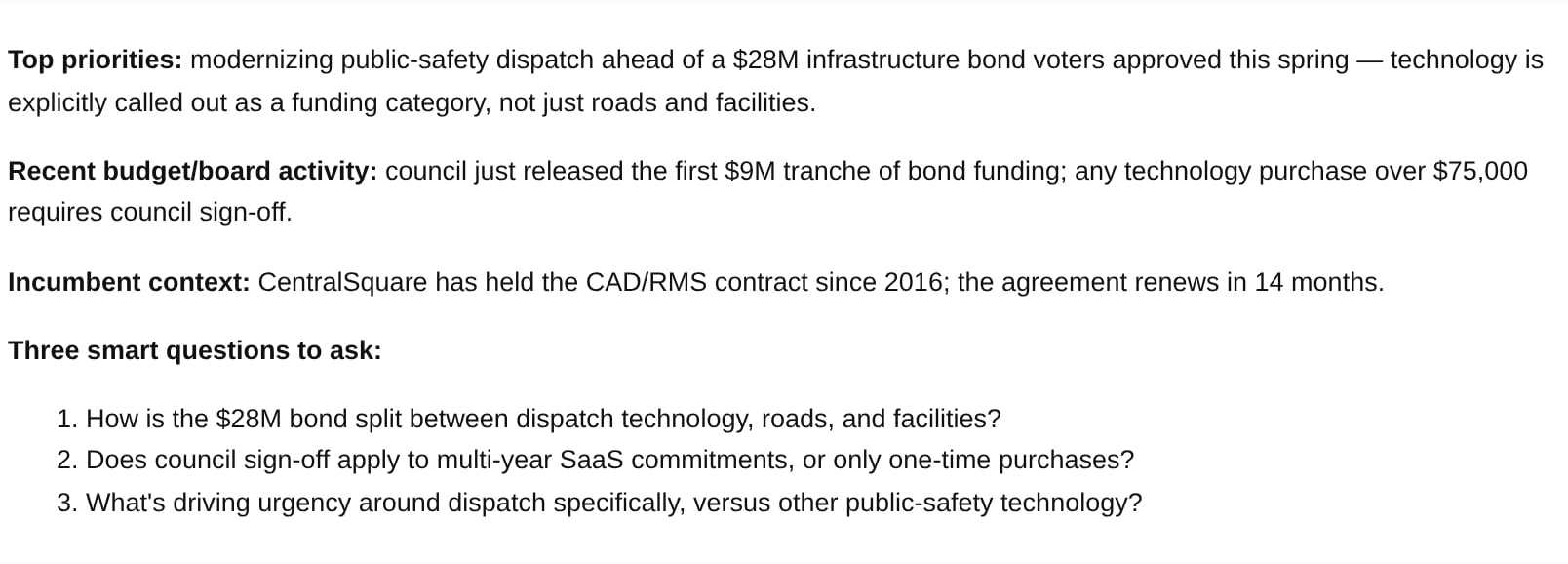
 ### Pre-meeting brief
*Who: AE, CS.*
Walk into every call knowing the account.
> *"I have a call with the City of Alderbrook tomorrow. Pull their Starbridge summary and recent signals and give me a one-page brief: top priorities, recent budget or board activity, any contracts expiring, and three smart questions to ask."*
### Pre-meeting brief
*Who: AE, CS.*
Walk into every call knowing the account.
> *"I have a call with the City of Alderbrook tomorrow. Pull their Starbridge summary and recent signals and give me a one-page brief: top priorities, recent budget or board activity, any contracts expiring, and three smart questions to ask."*
 You can turn this into a Skill, combining it with other data sources (CRM, Gong, etc.) to create a complete meeting-prep tool.
***
### Competitor contract renewal windows
*Who: AE, CS.*
Know exactly when a rival's contract ends so outreach lands before the buyer re-ups on autopilot.
> *"Show me tracked competitor contracts expiring in the next 12 months, with the vendor, product, and value."*
You can turn this into a Skill, combining it with other data sources (CRM, Gong, etc.) to create a complete meeting-prep tool.
***
### Competitor contract renewal windows
*Who: AE, CS.*
Know exactly when a rival's contract ends so outreach lands before the buyer re-ups on autopilot.
> *"Show me tracked competitor contracts expiring in the next 12 months, with the vendor, product, and value."*
 ***
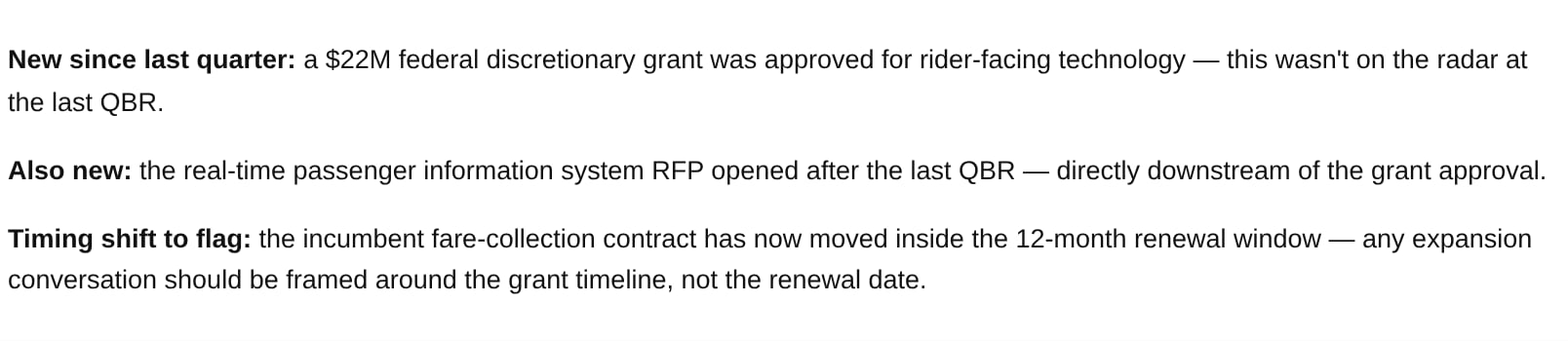
### QBR prep grounding
*Who: Customer success.*
Walk into a QBR with a fact base of what's actually changed since last quarter, not a guess.
> *"What's changed at Riverside Metro Transit Authority since our last QBR?"*
***
### QBR prep grounding
*Who: Customer success.*
Walk into a QBR with a fact base of what's actually changed since last quarter, not a guess.
> *"What's changed at Riverside Metro Transit Authority since our last QBR?"*
 ***
### Account plan grounding
*Who: AE, CS.*
Start account planning from real facts pulled live, instead of a blank template and a guess.
> *"Build me an account plan skeleton for Riverside Metro Transit Authority: budget, recent funding, incumbent vendor, and current initiatives."*
***
### Account plan grounding
*Who: AE, CS.*
Start account planning from real facts pulled live, instead of a blank template and a guess.
> *"Build me an account plan skeleton for Riverside Metro Transit Authority: budget, recent funding, incumbent vendor, and current initiatives."*
 ## Getting the best results
* **Name the buyer or Bridge precisely:** a specific district, county, or agency name — or "the Competitor Contracts bridge" — beats vague references.
* **Ask for structure:** tables, one-page briefs, and word limits get cleaner output.
* **Chain steps in one prompt:** "Pull X, then draft Y" works better than separate asks.
* **Pair with scheduled tasks** for anything recurring (digests, morning triage) so Starbridge comes to you.
* **Turn repeatable tasks into a Skill** so your team can run the same grounded workflow with one command.
## Related articles
What the Starbridge MCP is, what it supports, and how to connect it.
The full guide to researching accounts through chat.
This documentation is built and hosted on [Mintlify](https://mintlify.com), a developer documentation platform.
## Getting the best results
* **Name the buyer or Bridge precisely:** a specific district, county, or agency name — or "the Competitor Contracts bridge" — beats vague references.
* **Ask for structure:** tables, one-page briefs, and word limits get cleaner output.
* **Chain steps in one prompt:** "Pull X, then draft Y" works better than separate asks.
* **Pair with scheduled tasks** for anything recurring (digests, morning triage) so Starbridge comes to you.
* **Turn repeatable tasks into a Skill** so your team can run the same grounded workflow with one command.
## Related articles
What the Starbridge MCP is, what it supports, and how to connect it.
The full guide to researching accounts through chat.
This documentation is built and hosted on [Mintlify](https://mintlify.com), a developer documentation platform.