> ## Documentation Index
> Fetch the complete documentation index at: https://hc.starbridge.ai/llms.txt
> Use this file to discover all available pages before exploring further.
# Setting up your Organization Profile
> Configure your Organization Profile to personalize signals, scoring, and AI-generated content across Starbridge.
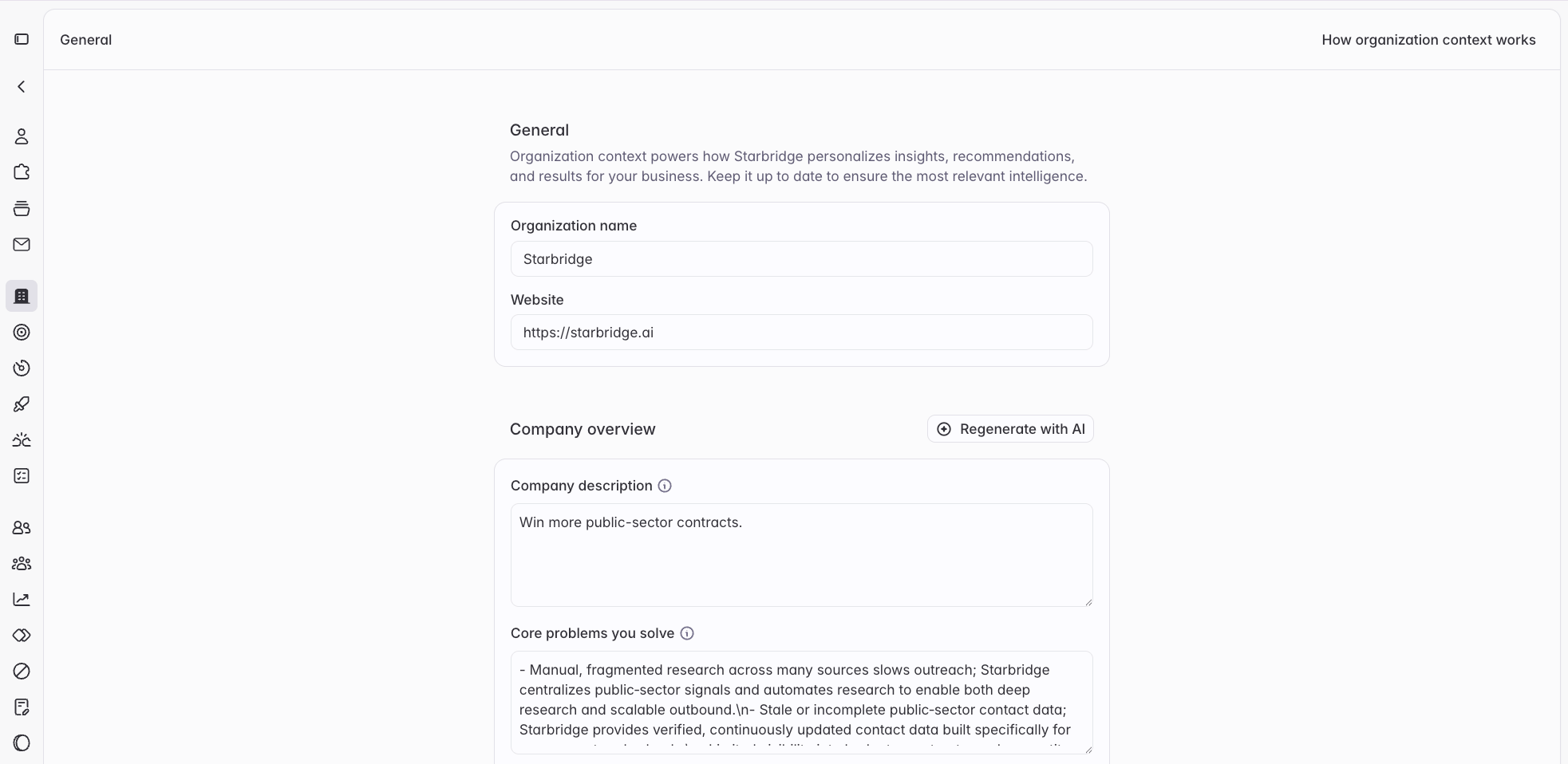 **Your Organization Profile is one of the most important things to get right in Starbridge.** It's the business context layer that powers how Starbridge understands your company - and it feeds directly into signals search and scoring, Ask Starbridge, AI-generated column content, and any emails or summaries Starbridge drafts on your behalf.
Starbridge auto-generates an Organization Profile when your account is created, but the generated content is only a starting point. **You should review it before using Starbridge in earnest, and keep it updated as your business evolves.**
Only Admins can view and edit the Organization Profile. Navigate to **Settings → Organization Profile** to get started.
## Why it matters
Every AI-powered feature in Starbridge uses your Organization Profile to contextualize its outputs. Concretely, that means:
* **Signals search & scoring** - Starbridge scores buyer signals against what's relevant *for your business*. If your ICP, competitors, or use cases are missing or wrong, signals get misfiled and buyers get mis-scored.
* **Ask Starbridge & Slackbot** - When you ask questions like "Who are our best-fit accounts in the mid-market?" or "Summarize why this account is a good fit," the answer is grounded in your Organization Profile. Thin or inaccurate context produces generic answers.
* **AI-generated columns** - When you create a column with AI (e.g., "Does this account show signs of legacy infrastructure?"), the prompt is enriched with your company context so the output reflects your positioning, not a generic tech company's.
* **AI-generated emails and content** - Starbridge-drafted emails and summaries reference your products, value props, and differentiators. Without accurate context here, generated content will read as off-brand or vague. **Message generation preferences** give you direct control over how that content is written.
The downstream impact of a stale or incomplete Organization Profile is real: insights feel off, answers feel generic, and it erodes trust in the platform. Spending 10–15 minutes here pays dividends across everything else.
## Sections at a glance
The Organization Profile is organized into five main sections. Each field has an info tip explaining what to include — read them before filling in a section, especially for fields like "Core Problems We Solve" and "Product Experience & Value Narrative" that are easy to get wrong.
### Company & Product Overview
The foundational layer. This is where Starbridge learns what your company actually does.
| Field | What to include |
| - | - |
| **Company Name** | Your legal or DBA name |
| **Company URL** | Your primary public-facing URL |
| **Company Overview** | 2–4 sentences on what your business does. Be specific — say what you sell and who you sell it to, not just a mission statement. |
| **Core Problems We Solve** | The actual problems your buyers experience before finding you. Frame these from the buyer's perspective, not your feature list. |
| **Products and Services** | The key things you sell. Include product names if you have them — Starbridge will use these when scoring and summarizing. |
| **Product Experience & Value Narrative** | What it's actually like to use your product. How do different personas — an admin vs. an end user, a VP vs. an IC — experience value differently? |
The **Core Problems We Solve** and **Product Experience & Value Narrative** fields have the biggest impact on Ask Starbridge quality. Generic filler here (e.g., "we help companies be more efficient") produces generic answers. Be specific about your buyers' pain and how your product addresses it.
### Customers & Competitors
This section anchors Starbridge's understanding of your market — who you sell to, who you beat, and why you win.
| Field | What to include |
| - | - |
| **Ideal Customer Profile** | Key segments, org types, headcount ranges, geographies, and budget indicators you target. The more specific, the better. |
| **Customers** | A handful of real, named customers — especially well-known logos. Starbridge uses these to find similar accounts. |
| **Buyer Personas & Target Titles** | Who actually buys and who champions the product internally. Include specific titles, not just "decision-maker."
**Your Organization Profile is one of the most important things to get right in Starbridge.** It's the business context layer that powers how Starbridge understands your company - and it feeds directly into signals search and scoring, Ask Starbridge, AI-generated column content, and any emails or summaries Starbridge drafts on your behalf.
Starbridge auto-generates an Organization Profile when your account is created, but the generated content is only a starting point. **You should review it before using Starbridge in earnest, and keep it updated as your business evolves.**
Only Admins can view and edit the Organization Profile. Navigate to **Settings → Organization Profile** to get started.
## Why it matters
Every AI-powered feature in Starbridge uses your Organization Profile to contextualize its outputs. Concretely, that means:
* **Signals search & scoring** - Starbridge scores buyer signals against what's relevant *for your business*. If your ICP, competitors, or use cases are missing or wrong, signals get misfiled and buyers get mis-scored.
* **Ask Starbridge & Slackbot** - When you ask questions like "Who are our best-fit accounts in the mid-market?" or "Summarize why this account is a good fit," the answer is grounded in your Organization Profile. Thin or inaccurate context produces generic answers.
* **AI-generated columns** - When you create a column with AI (e.g., "Does this account show signs of legacy infrastructure?"), the prompt is enriched with your company context so the output reflects your positioning, not a generic tech company's.
* **AI-generated emails and content** - Starbridge-drafted emails and summaries reference your products, value props, and differentiators. Without accurate context here, generated content will read as off-brand or vague. **Message generation preferences** give you direct control over how that content is written.
The downstream impact of a stale or incomplete Organization Profile is real: insights feel off, answers feel generic, and it erodes trust in the platform. Spending 10–15 minutes here pays dividends across everything else.
## Sections at a glance
The Organization Profile is organized into five main sections. Each field has an info tip explaining what to include — read them before filling in a section, especially for fields like "Core Problems We Solve" and "Product Experience & Value Narrative" that are easy to get wrong.
### Company & Product Overview
The foundational layer. This is where Starbridge learns what your company actually does.
| Field | What to include |
| - | - |
| **Company Name** | Your legal or DBA name |
| **Company URL** | Your primary public-facing URL |
| **Company Overview** | 2–4 sentences on what your business does. Be specific — say what you sell and who you sell it to, not just a mission statement. |
| **Core Problems We Solve** | The actual problems your buyers experience before finding you. Frame these from the buyer's perspective, not your feature list. |
| **Products and Services** | The key things you sell. Include product names if you have them — Starbridge will use these when scoring and summarizing. |
| **Product Experience & Value Narrative** | What it's actually like to use your product. How do different personas — an admin vs. an end user, a VP vs. an IC — experience value differently? |
The **Core Problems We Solve** and **Product Experience & Value Narrative** fields have the biggest impact on Ask Starbridge quality. Generic filler here (e.g., "we help companies be more efficient") produces generic answers. Be specific about your buyers' pain and how your product addresses it.
### Customers & Competitors
This section anchors Starbridge's understanding of your market — who you sell to, who you beat, and why you win.
| Field | What to include |
| - | - |
| **Ideal Customer Profile** | Key segments, org types, headcount ranges, geographies, and budget indicators you target. The more specific, the better. |
| **Customers** | A handful of real, named customers — especially well-known logos. Starbridge uses these to find similar accounts. |
| **Buyer Personas & Target Titles** | Who actually buys and who champions the product internally. Include specific titles, not just "decision-maker."
Starbridge will tag any contacts with these titles as **ICP** (ideal customer profile) or **Target** contacts. |
| **Competitors & Incumbents** | Tools and vendors you most commonly replace or compete against. Include the status quo (e.g., "spreadsheets" or "manual research") if that's a common competitor. |
| **Why Customers Choose Us** | Your differentiation in plain terms. Why do buyers choose you over the alternatives listed above? |
A common mistake is listing competitors without context. "We compete with Salesforce" is less useful than "We compete with Salesforce's native activity tracking — we win when teams need deeper intent signal coverage without a custom data team." Give Starbridge the reasoning, not just the name.
### Customer Use Cases & Outcomes
This section helps Starbridge surface relevant signals and frame value in the context of what your customers actually achieve.
| Field | What to include |
| - | - |
| **Key Outcomes/Results** | Quantified or qualitative results your customers consistently achieve. E.g., "25% increase in outbound response rate" or "reduced time-to-close by identifying intent earlier." |
| **Customer Use Cases & Case Studies** | Real examples of how customers use your product and what they got from it. Reference specific segments or company types if you have them. |
### Additional Information
An open-ended field for anything that doesn't fit elsewhere — niche market context, regulatory environment, go-to-market nuances, etc. Leave it blank if you don't have something specific to add; don't pad it with generic information.
### Message generation preferences
[Set this up](https://dashboard.starbridge.ai/settings/organization) if you are drafting emails or sequences in Starbridge.
Set message generation preferences so everything Starbridge writes on your behalf — from sequences to emails in Bridges to emails from Ask Starbridge — respect your preferences.
Write them as instructions you'd give a writer, not as a description of your company; the sections above already cover that. Tone, length, structure, words to avoid, preferred CTAs, etc.
| Write this | Not this |
| - | - |
| "Use a professional but conversational tone." | "Make it sound good." |
| "Keep messages under 120 words." | "Keep this email short." |
| "Never mention pricing or discounts." | "Avoid sensitive topics." |
| "Don't reference specific meetings names, dates, or quotes unless specifically prompted." | "Don't be creepy." |
Avoid the phrase "this email." The same preferences apply everywhere Starbridge generates messages, including multi-step sequences, so an instruction written for a single email can misfire elsewhere. Write "emails" or "messages" instead.
`Write in a professional but conversational tone. Keep messages under 120 words and use short paragraphs — no walls of text.`
`In a first email, lead with the signal or trigger event, then connect it to the buyer's likely priority. Don't open with an introduction of who we are.`
`Reference the signal at a general level — the topic or action, and a season or rough timeframe if it reads naturally. Don't cite the specific meeting, hearing, agenda item, or document it came from, and skip exact dates. Nothing should read like you're watching them closely or surveilling them.`
`Refer to the account the way someone local would say it, not its full formal name — drop suffixes like "Unified School District" or "Inc." unless the short form would be ambiguous.`
`Avoid corporate filler like "leverage," "synergy," "circle back," and "I hope this email finds you well." Never mention pricing or discounts.`
`Only name a reference customer if it's genuinely relevant to the recipient's role and organization type.`
`Close with a low-friction ask — a question, or a 15-minute suggestion — not a hard meeting demand.`
Preferences apply to your whole organization.
## Regenerating your profile
If you've made significant changes to your business and want to start fresh, you can regenerate your Organization Profile by clicking **Generate with AI** on the Organization Profile page.
Regenerating will **overwrite all manual edits** you've made. Starbridge will prompt you to confirm before proceeding. If you want to preserve specific customizations, copy them elsewhere before regenerating, then paste them back in afterward.
## Keeping it accurate
Your Organization Profile should reflect how you'd describe your company to a new hire on their first day - specific enough to be useful, accurate enough to trust.
A few situations that should prompt a review:
* You've launched a new product or expanded into a new segment
* Your ICP or pricing has shifted
* You've entered (or exited) a competitive market
* You've accumulated a set of new reference customers worth naming
* Ask Starbridge answers are starting to feel off or overly generic
There's no automated reminder to update your Organization Profile, so we recommend making it part of your quarterly GTM hygiene review.
## Frequently asked questions
Admins have access to view and edit the Organization Profile under **Settings → Organization Profile**.
The clearest signal is Ask Starbridge. Ask a question like "Why would a \[your ICP] care about \[your product]?" - if the answer is accurate and specific to your business, your profile is in good shape. If it's generic or wrong, find the relevant section and update it.
No, but the more complete your profile, the better Starbridge's outputs will be. At minimum, we recommend filling in **Company Overview**, **Core Problems We Solve**, **Ideal Customer Profile**, and **Competitors & Incumbents** before building your first Bridge.
This documentation is built and hosted on [Mintlify](https://mintlify.com), a developer documentation platform.